Kudos Interiors | call: 01483 233166 | email: enquiries@kudosinteriors.com

Call back request

Ergonomics

At Kudos we take ergonomics very seriously and it has been proven that every business and educational institution have benefited from higher productivity when actions have been implemented.

Kudos has worked closely with BP Occupational Health over the last 12 years offering unbiased advice, recommending and supplying different ergonomic chairs to suit individual needs. We visit regularly to set up and demonstrate the chair to the user in order to achieve correct sitting.

Ergonomics is the study of interaction between people, their environment and the equipment that they use is Ergonomics. When companies are deciding on their workspace or venue, they need to take into account all of these elements in order to create the perfect design.

At Kudos, we ensure that all of our products correspond to the principles of ergonomics. As well as increasing productivity and wellbeing, ergonomics can prevent injuries and discomfort.

Ergonomic furniture can be seen as expensive, but when compared to the cost of venues or workplaces not being suitable for those that use them, the price really isn’t an issue, and is more of an investment for our clients. As always, Kudos will offer the most effective way of buying the right Ergonomic furniture.

Click to download the PDFClick to download HSE information “Understanding Ergonomics” (PDF)

How to adjust your office chair to achieve correct sitting

1. Chair Height

Adjusting the chair’s seat height – Raise or lower your chair so your knee’s and hips are at an angle of at least 90 degrees with feet flat on the floor. A common mistake is the seat height is too high (normally because the desk work-surface is too high) and therefore pressure will be felt under the legs and thighs. N.B The seat height may have to be raised up (and a footrest used) to achieve the correct positioning of arms.

2. Positioning of your arms

Elbows should be bent and at a 90 degree angle with forearms and hands level on the desk and keyboard. To achieve this, (at a fixed desk) the height of the chair may need to be risen which may increase the angle of the knees and hips. (A incorrect position) Therefore this could be corrected by using a footrest. A common problem is shoulder and neck ache from having the keyboard and the mouse too far away and therefore the arm becomes stretched and bent at the elbow. Bring your mouse and keyboard closer to you.
Height of desk (Only if sitting at a height adjustable desk)
With height of chair correct, arms should be brought up to form 90 degree
angle at the elbow when working at keyboard – desk should be wound up or
down to achieve this. It is not good if your desk is too high as you will be keying uphill and
Not getting best circulation to hands when typing.

3. Chair Back

The spine requires lower back lumbar support and needs to be in constant contact with the back of a chair. Most people hunch over their workstation giving rise to back problems. It is important the back moves up and down and the lumbar support of the ergonomic chair is adjusted correctly (usually just on/above belt line) to achieve maximum support.

4. Chair Back Angle

You should have a lever at the side of your chair which can adjust the angle of the back of the chair. Your position should be just back a bit from the 90 degree upright position.

This position can then be locked once a comfortable position is found, however we believe the back of the chair should move in a free float motion. When the chair is left on free-float this allows the whole chair to move with the person, however you may find you have to loosen the tension control if there is resistance or tighten the tension control if the back does not fully support you when you lean back. (See Tension control) In some chairs this same lever will change the angle of the seat and tilt your hips forwards and backwards, keeping a constant good angle for your back. Some chairs have a Synchro mechanism which works with the person’s bodyweight to support them, and allow them to move in the chair without too much muscle effort.

5. Tension Control- usually position underneath seat of the chair

Normally you would turn this knob clockwise to loosen the tension and anti-clockwise to tighten depending on person’s weight. Once you have changed this tension you will find the free-float position far more comfortable.

6. Seat Depth

When sitting on your office chair the distance between the front edge of your office chair to the back of your knees should be a space of 2-4 fingers. If you are a tall person, you may require a deeper seat pad which can be achieved with good ergonomic office chairs with a seat slide. The same applies if you are petite, then you require a seat slide to shorten the depth of the seat pad of the chair.

7. Armrests

If you have adjustable arms on your office chair and they can move up and down, make sure your elbow is at 90 degree angle and adjust the arms of the chair just below your arms. Armrests should not be too high – just skimming underneath elbows. If the armrests move in and out, this can useful to move them back so they do not hit the desk and allows you sit closer to the desk. If your armrests on your office chair are not adjustable and keep hitting the desk it may be advisable to remove them from the office chair.

8. Monitor Screen

Positioning of the monitor screen on your desk affects “sitting comfortably”
When the person looks straight ahead with no up or downward movement of their head they should see the top quarter / third of the screen. If not, the screen height needs to be adjusted up or down, and may need additional VDU blocks to raise it further.

Click to download the PDFClick to download diagrams showing correct sitting (PDF)

Please contact us at Kudos Interiors, enquiries@kudosinteriors.com if you need any workstation assessments, advice on how to get your employees/students sitting correctly or need a review on your existing office chairs.

Products available to create a healthy workstation.

Height adjustable desk

There are many height adjustable desks available on the market now, either manual crank or electric. These are not as expensive as people expect and at Kudos Interiors we can offer advice and many options to suit your needs and budget. If your desk is adjustable then it can be lowered so the user's feet can come into contact with the ground.

Cable management for your existing desks

Most office desks have loose wires are hanging below the desk and trailing on the floor. This is Health & Safety hazard and restricts where your feet can go. Cable management system for the desks to tidy up these wires should be considered and are relatively cheap to purchase.

Monitor risers and monitor arms

As in “how to adjust your office chair” the position of the monitor at the correct height will prevent postural problems A monitor should be at a comfortable distance no nearer than 45cm or arms length from the user. If you have difficulty in positioning the monitor in the correct position then a monitor arm or VDU risers/stand will help

Computer Keyboards/Wrist pads

How people position their keyboard and type can cause damage to their muscles, nerve and tendons The 90 degree angle at the elbow should be kept and your wrists and the lower arm should remain as straight as possible. There should be sufficient space in front of the keyboard to comfortably rest your wrists in between periods of typing. Inexpensive wrist pads can be provided to keep the wrist straight and put less pressure on the tendons. There are many Ergonomic shaped keyboards available.

Laptop Stands

For some people a laptop is their primary typing device, and the same principles apply as above when using a keyboard. Ideally if you use the laptop for long periods of time you should consider a laptop stand with a small separate keyboard.

Mice

The mouse should be positioned below bent elbow height and within easy reach. You should be able to operate the mouse without the need to your stretch and change your seating posture.

Operate the mouse by holding it lightly in your hand. If you are suffering RSI or pains in your wrist we can look at the many ergonomics mice available on the market. If the mouse movement appears jerky, slow or too fast it may need cleaning or you may need to adjust the setting on your computer.

Monitor Filters

It is important not to have reflective glare onto your monitor screen and normally can be reduced by drawing blinds to cut down on the direct sunlight. In some occasions this is not efficient due to other lighting sources within the office therefore an anti-glare reflective screen would be beneficial to put onto your monitor.

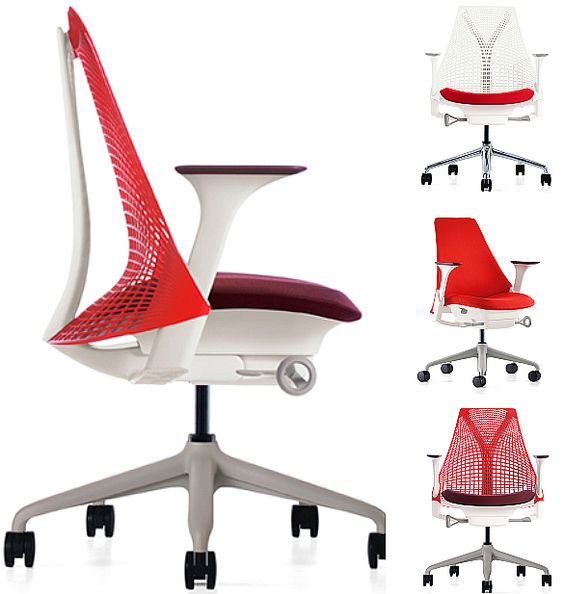
Kudos Ergonomics ImageKudos Ergonomics ImageKudos Ergonomics ImageKudos Ergonomics ImageKudos Ergonomics Image

Kudos Ergonomics ImageKudos Ergonomics ImageKudos Ergonomics ImageKudos Ergonomics Image

Website design and developement by Design Imaging